
Free
$0
Free forever
- Amanecer (A1) starter lessons across Speak, Practice and Listen
- The complete dictionary, A1 stories and spaced review
- Everyday phrasebook and 5 personal phrases
- The first two Ruta VA stages
Ruta VA · Speaking-first Spanish
Soltura is a speaking-first Spanish app for virtual assistants: its Ruta VA course has you reply out loud to client calls, inboxes and follow-ups, offline, while italki matches you with live 1-on-1 tutors and Language Transfer is a free audio course for building sentences. Spanish for virtual assistants is practical spoken Spanish for the client calls, inboxes, scheduling and follow-ups that remote and work-from-home virtual assistants handle for Spanish-speaking clients, aimed at English-speaking VAs in the Philippines, India, Africa and Latin America, and in the USA and Canada, whose clients or customers speak Spanish. Start with the research: why virtual assistants should learn Spanish, do bilingual employees get paid more?, what is a bilingual virtual assistant? Spanish phrases for customer service, Spanish phrases for work with clients and bilingual virtual assistant jobs. Soltura is free on the App Store for iPhone, iPad and Mac.

Free on iPhone, iPad and Mac
Short answer: Soltura is not a job board: it is the speaking-first Spanish app whose Ruta VA course has you reply out loud to client calls, inboxes and follow-ups, offline, so you can practise the Spanish a bilingual VA job asks for. To find the jobs themselves, search six places: BilingualJobs.io (a job board that lists only bilingual roles, with a remote Spanish virtual assistant filter), OnlineJobs.ph (a job board for Filipino remote workers), Upwork (hourly and fixed-price freelance projects), Indeed (a general job site with country sites), Virtual Latinos (long-term client roles for VAs mostly from Latin America) and Virtustant (a staffing agency’s job board for remote roles with US companies, aimed at Latin America).
Each line below comes from the board’s own pages. Last checked October 28, 2026: BilingualJobs.io, OnlineJobs.ph, Upwork, Virtual Latinos and Virtustant were opened that day; the Indeed row is from October 27, 2026. Job counts change daily, so treat them as a snapshot. More employers that hire Spanish-speaking VAs are on bilingual virtual assistant jobs.
| Board | Best for | What its own page says (last checked October 28, 2026) | How to search it |
|---|---|---|---|
| BilingualJobs.io | Bilingual VAs anywhere who want listings already filtered to English and Spanish | Calls itself “the world’s first bilingual job board”; its remote Spanish virtual assistant page showed 8 openings, each tagged English and Spanish (most were medical virtual assistant roles), and says you can apply for free with no sign-up required | Open Remote, then Spanish, then Virtual Assistant; read each listing’s location line before you apply |
| OnlineJobs.ph | VAs based in the Philippines | A job board for hiring Filipino remote workers; employers hire you directly (“no middlemen”), and the job list filters Gig, Part-Time and Full-Time | Find Jobs, then search “Spanish” or “bilingual” |
| Upwork | Freelancers anywhere who want project or hourly work | Showed a sample of 2,705 Virtual Assistant jobs posted on Upwork, hourly and fixed-price | Browse the Virtual Assistant jobs and add “Spanish” to your search |
| Indeed | Employee and agency roles in your own country | Its About page says it operates in over 60 countries; it has country sites such as Indeed Philippines, and the US site is also available in Spanish | Search “bilingual Spanish virtual assistant” with “Remote” as the location; on the Spanish-language site, try “asistente virtual bilingüe” |
| Virtual Latinos | VAs in Latin America who want a long-term part- or full-time client | Says its community is focused on talent mostly from Latin America, that it accepts only 5% of applicants, and that the full application on its VL Portal takes about 20–30 minutes, not counting the required tests | Apply through its “How to join” steps |
| Virtustant | VAs in Latin America who want an agency placement with a US company | A remote staffing agency that recruits across 18 Latin American countries for US companies; its job board listed a full-time Bilingual Virtual Receptionist role that asks for fluent English and Spanish at C1 or C2 level, open to applicants in Argentina and Brazil | Filter by Virtual Assistant & Admin; each listing says who can apply |
The plain difference: BilingualJobs.io lists only bilingual jobs, so every result already asks for a second language; OnlineJobs.ph, Virtual Latinos and Virtustant are regional (Philippines and Latin America), and Virtustant hires you through the agency rather than directly; Upwork is project-based freelancing open to any country; and Indeed is a general job site where you filter for remote bilingual roles yourself. Whichever you use, expect the interview or first client call to happen partly in Spanish; practise it out loud with the client-call script below or in Soltura, free on the App Store for iPhone, iPad and Mac.
Short answer: A virtual assistant learns Spanish for client calls by practising the calls out loud: Soltura (Ruta VA) for the VA calls themselves, Language Transfer or Dreaming Spanish for the base and the ear, Duolingo for short daily lessons, HelloTalk for a native-speaker exchange partner, and a tutor on italki or Preply for live practice. The plain difference: Soltura’s Ruta VA is the only one of these built around VA client calls, inboxes and follow-ups (you reply out loud to client lines, offline), while Language Transfer is a free Thinking Method audio course, Dreaming Spanish builds listening with comprehensible-input video, Duolingo teaches general Spanish in bite-size lessons, HelloTalk is a language exchange by text, voice or video, and italki and Preply are marketplaces of 1-on-1 tutors. Learn the fixed lines a call needs (greeting, confirming the request, scheduling, repeating back, closing) using usted, then rehearse them as spoken role-plays until you can answer without reading.
One short call a virtual assistant makes for a client, line by line, with usted. Say each Spanish line out loud until you can answer without reading. More lines are on Spanish phrases for work with clients, and a full inbound support call is on Spanish phrases for customer service.
| Step | Spanish | English |
|---|---|---|
| Open and check the line | Buenos días, le habla [nombre]. ¿Me escucha bien? | Good morning, this is [name]. Can you hear me well? |
| Say why you are calling | Le llamo para coordinar la reunión con Alex. ¿Cuánto tiempo necesita? ¿Treinta minutos? | I’m calling to arrange the meeting with Alex. How much time do you need? Thirty minutes? |
| Ask the time zone | ¿En qué zona horaria? | In which time zone? |
| Offer a time in both zones | ¿Le parece bien el viernes a las 15:00, hora de Ciudad de México? Serían las 17:00 en Nueva York. | Does Friday at 3:00 p.m. Mexico City time work for you? That would be 5:00 p.m. in New York. |
| If you did not catch it | Perdón, ¿me lo puede repetir, por favor? | Sorry, could you repeat that, please? |
| Recap before you hang up | Entonces, quedamos en que la reunión es el viernes a las 15:00, hora de Ciudad de México. | So, we agreed the meeting is on Friday at 3:00 p.m. Mexico City time. |
| Next step | Le envío la invitación con el enlace y le mando un resumen por correo. | I’ll send you the invite with the link and a summary by email. |
| Close | ¿Hay algo más en lo que le pueda ayudar? Que tenga un buen día. | Is there anything else I can help you with? Have a good day. |
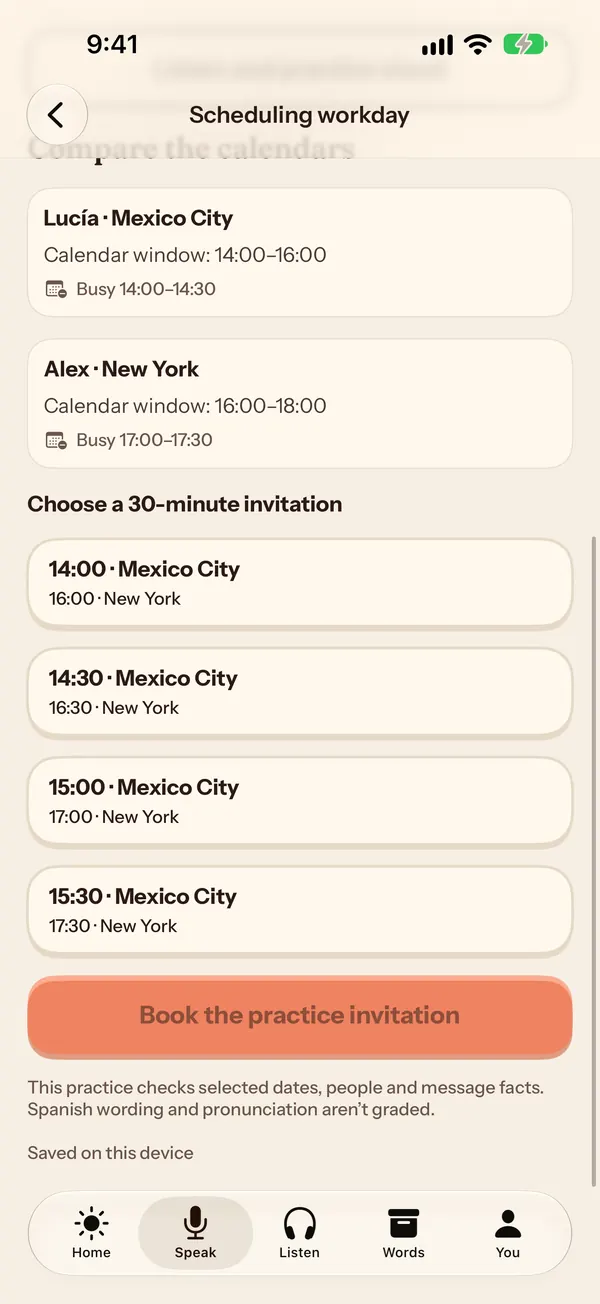
In Soltura, the free Ruta VA scheduling workday turns a Spanish scheduling request into offline practice across two time zones; nothing real is sent.
We make Soltura, so it is listed first. The other rows come from each provider’s own pages, re-opened October 23, 2026 (Duolingo, HelloTalk and Business Spanish for Your Job opened October 29, 2026). Plans change, so check the linked page before you pay.
| Option | What it is | Client-call practice | Cost |
|---|---|---|---|
| Soltura (Ruta VA) | Speaking-first Spanish app with a seven-stage course for virtual assistants; free on the App Store for iPhone, iPad and Mac | Built in: you reply out loud to client lines; scheduling, calls and follow-up workdays run offline | Free plan includes the first two Ruta VA stages; Pro $4.99/month or $39.99/year (US) |
| italki | Marketplace of 1-on-1 online teachers and group classes | Live practice with a person; you set the topic (including VA client calls) | Pay as you go, no subscription; teachers set their own prices |
| Preply | Marketplace of online language tutors (100,000+ tutors claimed on their homepage) | Live 1-on-1 calls; you set the topic (including VA client calls) | Pay per lesson; tutors set prices (15,486 Spanish tutors listed and a price filter from $3 to $40+ per lesson on October 23, 2026) |
| Language Transfer | Free audio course (Complete Spanish) built on its Thinking Method | Not call-specific; helps you build sentences | Free, donation-funded; no sign-up |
| Dreaming Spanish | Comprehensible-input videos that get harder over time, input hours tracked (its site is now dreaming.com) | Not call-specific; builds listening | Premium subscription; its FAQ says there is no yearly or family plan for now |
| SpanishDictionary.com | English–Spanish dictionary, translator, conjugations and lesson path | Not call-roleplay; look up phrases and study lessons | Free site; see their plans for extras |
| Duolingo | General Spanish course in bite-size lessons, on its mobile app and the web | Not call-specific; short daily lessons for vocabulary and grammar | Its course page says the app and web are free; see their site for paid plans |
| HelloTalk | Language-exchange app: you chat with native speakers who are learning your language, by text, voice or video, plus live Voicerooms | Real conversation with native speakers; not structured around client calls, so you bring the topic | Its homepage says you can practise for free |
| Business Spanish for Your Job | Business Spanish site by Miguel Lira, with a free 5-day email video course (greeting customers, asking questions, numbers and prices) | Customer-facing phrases on video; not a VA call role-play | Free 5-day course after email sign-up; premium materials sold on the site |
The difference: Soltura is the only option here built around the calls, inboxes and follow-ups of virtual-assistant work; the others are general Spanish tools you adapt yourself. See also Duolingo alternatives for Spanish.
Short answer: Language Transfer, Dreaming Spanish and Preply each cover one part of client-call Spanish, and Soltura covers the call itself: Language Transfer builds sentences (free audio), Dreaming Spanish builds listening (comprehensible-input video), Preply gives you a live tutor, and Soltura’s Ruta VA has you say the VA call lines out loud from day one. The plain difference is when you speak: Dreaming Spanish’s own FAQ advises building input hours before you speak much, while Soltura is speaking-first, so a virtual assistant who already has client calls on the calendar practises the replies now. Many VAs combine one listening or sentence-building tool, one live tutor and one speaking drill.
| If you need… | Best fit | Why (from the provider’s own page, October 23, 2026) |
|---|---|---|
| To say the lines of a real VA client call out loud now | Soltura (Ruta VA) | Speaking-first: you hear a client line and reply out loud; scheduling, calls and follow-up workdays run offline. Free plan; Pro $4.99/month or $39.99/year (US, App Store) |
| A free way to start building sentences | Language Transfer | Complete Spanish audio course on its Thinking Method; no price tags, no adverts and no sign-ups; runs on donations |
| To understand clients at natural speed | Dreaming Spanish | Comprehensible-input videos at Superbeginner, Beginner, Intermediate and Advanced levels, with input hours tracked; its FAQ recommends input before much speaking |
| A live person who interrupts and asks follow-ups | Preply or italki | Preply listed 15,486 Spanish tutors and offers free tutor replacement; italki has no subscriptions. Lesson prices vary by tutor on both |
None of the other three is built around VA client calls, so bring your own script (like the one above) to a tutor session. Download Soltura free on the App Store for iPhone, iPad and Mac.
Soltura is built for English-speaking virtual assistants who work with Spanish-speaking clients. Practice the conversations you actually have at work, and the everyday Spanish around them. See what Soltura is and who it is for, or return to the research guides linked above.
Each scene is a guided conversation in a real-life situation. Listen to a line, then reply out loud, so you practice speaking from day one.
Ruta VA is a seven-stage roadmap for virtual assistants: inbox triage, scheduling, calls, workplace tools and client relationships. It ends with a practice report you can share.
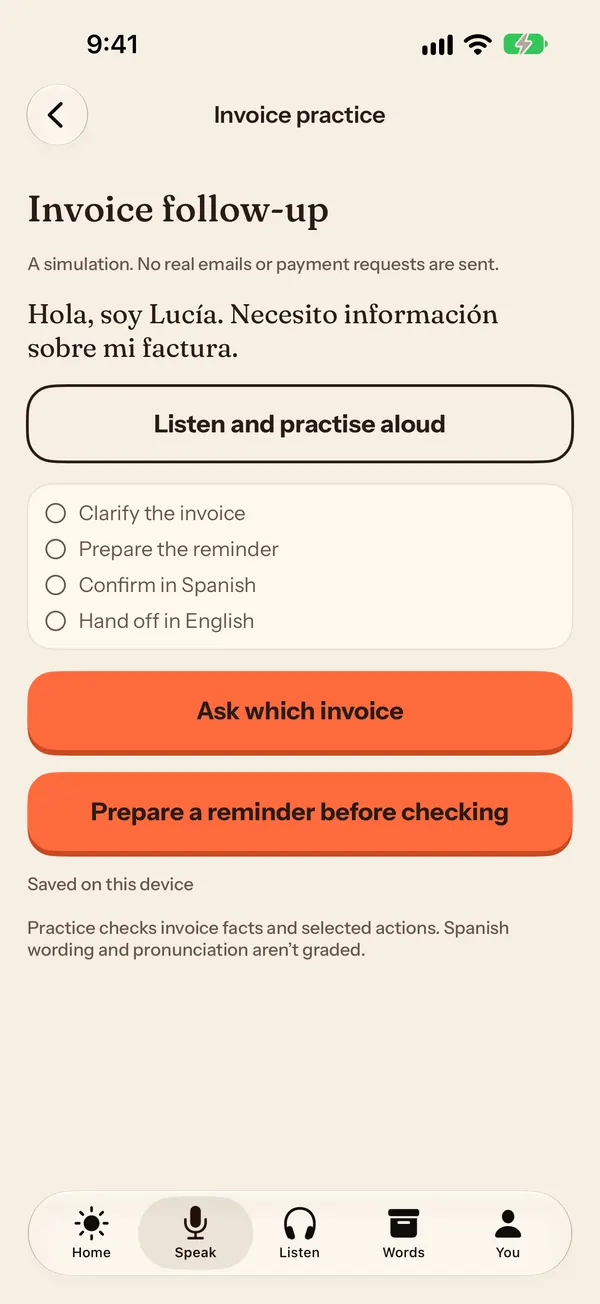
Workdays are offline simulations of real VA tasks. Schedule a meeting across time zones from a Spanish request, follow up on an unpaid invoice, or hand off a customer case, then brief your manager in English. Nothing real is sent. The first scheduling workday is free; changed cases and the invoice and customer workdays come with Soltura Pro.
Pick neutral Latin American, Mexican or Spain Spanish. Scenes, listening and drills follow the accent you choose, and you can switch anytime.
Clear explanations and examples, saved and custom phrases, drills, grammar guides, listening practice, Historias (stories), a dictionary, spaced review and a phrasebook.
There are no streaks to lose. Soltura counts your días con soltura, and that number only goes up. Miss a day and nothing is lost.
Spoken replies are checked with Apple’s on-device speech recognition when an offline Spanish model is available. If it isn’t available, the app tells you. Your audio isn’t sent to a Soltura server, no account is needed, and your progress stays on your device.
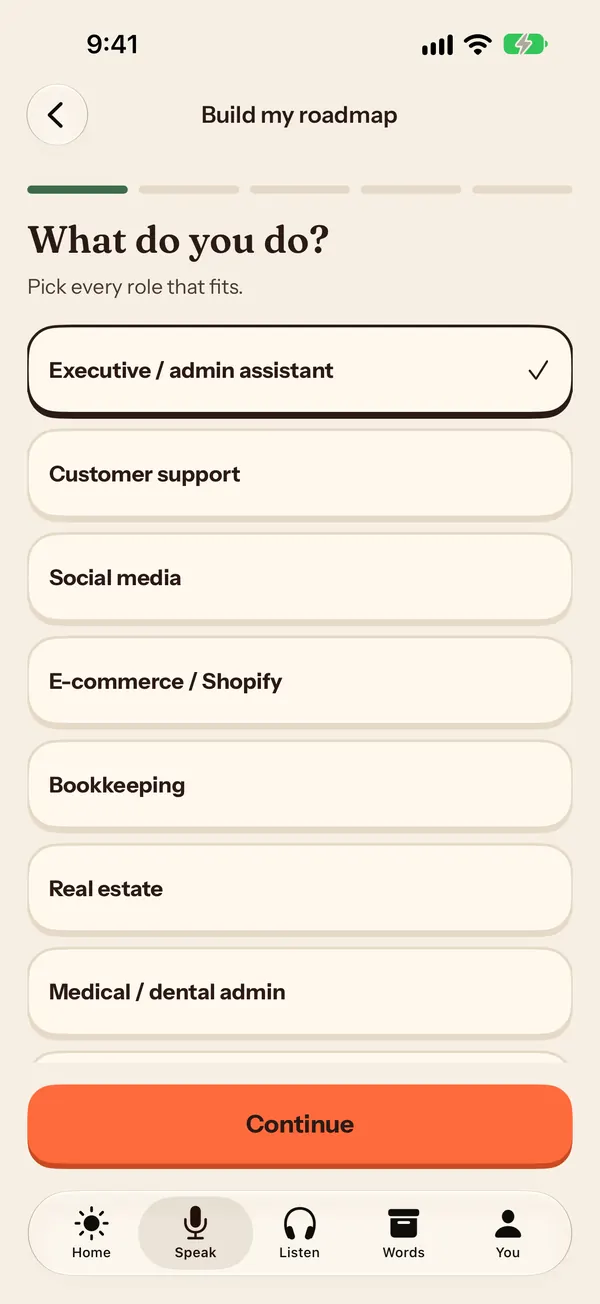
Real screens from Soltura 1.0 on iPhone. Ruta VA asks which VA roles you do, then the workdays turn real tasks into offline practice: nothing is sent to anyone.
08 · Plans
A1 starter lessons and the complete dictionary stay free. Either Pro plan unlocks every lesson through C1. No account needed.
Free
$0
Free forever
Best value · Save 33%
Pro Yearly
$3.33/month
3 days free, then $39.99 billed once a year
Pro Monthly
$4.99/month
Billed monthly, cancel anytime
US prices shown; local prices may vary.
The DELE/SIELE-style practice papers are written for Soltura for practice. They are not official DELE or SIELE exams and never give an official score or certification.
New to the role? Start with what a bilingual (Spanish-speaking) virtual assistant does, then see where bilingual Spanish VA jobs are posted and whether bilingual people get paid more.
Questions
Search BilingualJobs.io for listings that already require English and Spanish (it has a remote Spanish virtual assistant filter), OnlineJobs.ph if you are in the Philippines (a job board where employers hire Filipino remote workers directly), Upwork for hourly or fixed-price freelance projects, Indeed for employee and agency roles in your country (search “bilingual Spanish virtual assistant” with “Remote” as the location), and Virtual Latinos or Virtustant if you are in Latin America and want a long-term client or an agency placement with a US company. Soltura is not a job board; it is a speaking-first Spanish app whose Ruta VA course lets you practise VA client calls out loud before the interview. See the job-board table on this page (last checked October 28, 2026).
Yes. Soltura is a speaking-first Spanish app for virtual assistants: its Ruta VA course has you reply out loud to client calls, inboxes and follow-ups, offline, and it is free on the App Store for iPhone, iPad and Mac. If you want a live person instead, italki is a marketplace of 1-on-1 tutors (pay as you go, no subscription), and Language Transfer is a free, donation-funded audio course for building sentences.
Yes. The client-call script on this page walks one scheduling call in Spanish with usted: open and check the line (“¿Me escucha bien?”), say why you are calling, ask the time zone (“¿En qué zona horaria?”), offer a time in both zones, recap (“Entonces, quedamos en que…”), send the invite and close (“¿Hay algo más en lo que le pueda ayudar?”). Rehearse it out loud until you can say it without reading.
A virtual assistant learns Spanish for client calls by practising the calls out loud. Use Soltura (Ruta VA) for spoken role-plays of VA client calls, inboxes and follow-ups, a tutor on italki or Preply for live calls, and Language Transfer (free audio) or Dreaming Spanish (listening) for the base. Learn the call skeleton with usted, then rehearse whole calls until you can answer without reading.
Use italki or Preply when you want a live tutor (both are 1-on-1 marketplaces where tutors set their own prices), Language Transfer for free sentence-building audio, Dreaming Spanish for listening hours, SpanishDictionary.com to look up phrases, and Soltura Ruta VA when you want offline spoken role-plays of VA client calls, scheduling and follow-ups. Soltura is free on the App Store for iPhone, iPad and Mac.
Not on their own. Language Transfer is a free audio course for building sentences and Dreaming Spanish builds listening with comprehensible-input video (its FAQ advises input before much speaking); neither is built around client calls. Add spoken practice of the call itself: Soltura Ruta VA has you reply out loud to VA client lines offline, and a Preply or italki tutor gives live practice. Soltura is free on the App Store for iPhone, iPad and Mac.
Not on its own. Duolingo teaches general Spanish in bite-size lessons and HelloTalk pairs you with native speakers for a text, voice or video exchange; neither is built around VA client calls. Add spoken practice of the call itself: Soltura Ruta VA has you reply out loud to VA client lines offline, and it is free on the App Store for iPhone, iPad and Mac.
When you only use Android or Windows (Soltura is on the App Store for iPhone, iPad and Mac only), when you need a live person to interrupt you (book an italki or Preply tutor, or find a HelloTalk partner), when a client asks for an official certificate (Soltura’s practice papers are not official exams and give no official score; the recognized certificates are the DELE and the SIELE), or when the job is certified medical or legal interpreting, which is a separate qualification.
Soltura is a speaking-first Spanish app for English speakers learning Spanish, with a dedicated course for virtual assistants called Ruta VA. It is available on the App Store for iPhone, iPad and Mac.
Download Soltura free on the App Store for iPhone, iPad and Mac. Soltura Pro is optional at $4.99 a month or $39.99 a year (US prices), and the yearly plan includes a 3-day free trial for eligible subscribers.
Yes. Soltura’s workdays simulate a scheduling request, an invoice follow-up and a customer handoff in Spanish: you clarify the request, take the action and brief your manager in English. They run offline and nothing real is sent. The first scheduling workday is free.
Short, polite set phrases that use usted: “¿En qué le puedo ayudar?” (How can I help you?), “¿Me lo puede deletrear, por favor?” (Could you spell that, please?), “¿Me permite un momento, por favor?” before a hold, and “¿Hay algo más en lo que le pueda ayudar?” before closing. The full list is in our Spanish phrases for customer service guide.
Adult English speakers who want to speak Spanish in everyday life and at work, especially virtual assistants who work with Spanish-speaking clients.
Ruta VA is a seven-stage roadmap for virtual assistants: triaging a Spanish inbox, scheduling, calls, workplace tools and client relationships. It ends with a practice report you can share. Everyday conversation is covered too.
Pick neutral Latin American, Mexican or Spain Spanish. Scenes, listening and drills follow the accent you choose, and you can switch anytime.
The Free plan is free forever at $0 and includes Amanecer (A1) starter lessons, the complete dictionary and the first two Ruta VA stages. Soltura Pro is $39.99 per year after a 3-day free trial, or $4.99 per month with no trial. US prices; local prices may vary.
Your audio is not sent to a Soltura server, and no Soltura account is needed. Spoken replies are checked with Apple’s on-device speech recognition when an offline Spanish model is available; if it is not, the app says so. Your progress stays on your device.
09 · Download
Soltura is free on the App Store for iPhone, iPad and Mac, with optional Soltura Pro.
Free on iPhone, iPad and Mac